



Publishing your book on Kindle Direct Publishing (KDP) is an exciting step for any author, whether you are a first-time writer or an experienced self-publisher. However, one of the most important factors that can make or break your book’s success is formatting. Poor formatting can make your book look unprofessional, frustrate readers, and lead to bad reviews, while good formatting ensures your story is presented clearly and beautifully.
When learning how to format a book for KDP, you must focus on creating a layout that matches both Kindle eBook and paperback requirements. Amazon has specific guidelines on margins, fonts, spacing, and image quality, and meeting these requirements is essential if you want your book to pass KDP’s review process without delays. A professionally formatted book also provides a pleasant reading experience, whether your audience is reading on a Kindle device, a tablet, or holding a printed paperback.
The process might seem technical at first, but the good news is that you do not need to be a design expert. You simply need to follow the steps carefully, choose the right tools, and avoid common mistakes. Many authors now use software or templates designed specifically for KDP, which can save time and reduce errors. In this guide, we will walk through the key steps, from setting up your manuscript to finalizing the file for upload, so you can publish confidently and professionally.
Understanding The Basics Of How To Format A Book For KDP
Before you start formatting, it is important to understand that Kindle Direct Publishing accepts files in formats like DOCX, EPUB, and PDF. The way your file is prepared will determine how it appears both digitally and in print. For Kindle eBooks, text should be reflowable so readers can adjust font size and style on their devices. For paperbacks, fixed layouts with correct trim size and margin settings are essential.
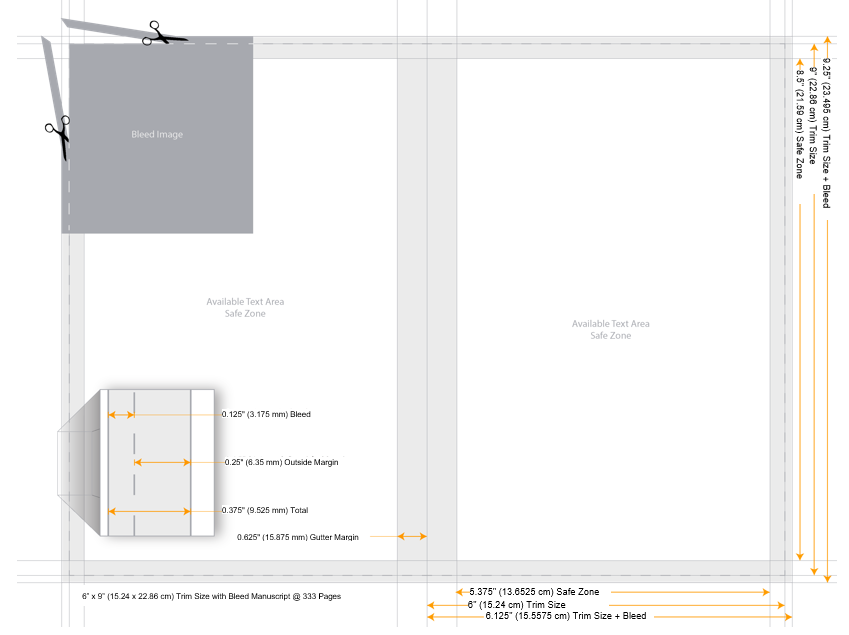
The first step is choosing the right trim size for your book. Once you decide on a size, adjust your document settings accordingly before writing or importing your text. This will ensure that all your chapters, headings, and images are aligned to the correct dimensions.
Self publisher authors handle every stage of the book publishing process themselves, from writing and editing to design and distribution. They often use platforms like Amazon KDP or Draft2Digital to release their books independently, retaining full creative control and earning higher royalties.
Using Tools And Templates For Faster Formatting
How to format a book for KDP is by using templates or book formatting software. These tools can automatically set margins, headers, and page numbers, saving you hours of manual adjustments. Amazon offers free templates for both paperback and eBook formatting, which are a great starting point for beginners.
If you want more customization, you can use programs like Microsoft Word, Google Docs, or more advanced tools like Scrivener, Atticus, and Vellum. These platforms allow you to design professional-looking layouts with chapter headings, drop caps, and page breaks without needing deep technical skills. For authors on a budget, free book formatting software is also available, offering many of the features needed to prepare your manuscript for KDP.
When using any formatting tool, remember to set section breaks between chapters, ensure images are high resolution (at least 300 DPI for print), and check that all your hyperlinks work correctly for eBook versions. Children’s book authors often focus on storytelling with simple language and strong visual elements to engage young readers.
Common Mistakes To Avoid When Formatting For KDP
Many authors rush through formatting, which can lead to errors that hurt the reading experience. One of the most common mistakes is inconsistent spacing between paragraphs or incorrect indentation. For eBooks, always use paragraph styles instead of manually adding spaces or tabs, as this ensures consistent formatting across devices.
The gutter is the inner margin that allows space for binding, and if it is too small, your text may get cut off near the spine. Always follow KDP’s margin guidelines to avoid this problem.
Uploading low-quality images is another common issue. For paperbacks, pixelated images can make your book look amateurish. Always use high-resolution images that meet KDP’s print requirements. Finally, do not forget to preview your book using KDP’s online previewer or download the file to check how it looks on different devices. This step can catch layout issues before your readers see them.
Final Steps Before Publishing On KDP
Upload your manuscript and know how to format a book for KDP, and then carefully review it using Amazon’s preview tools. Check every chapter for consistent formatting, ensure page breaks are in the right place, and verify that images and tables display correctly. You should also double-check your table of contents to confirm that all links work in the eBook version. Book illustration plays a key role in genres like children’s literature, graphic novels, and educational materials.
After you approve the preview, your book will go through Amazon’s review process, which typically takes up to 72 hours. If everything meets the requirements, your book will be published and available for sale worldwide. Good formatting will not only make your book look professional but also encourage readers to leave positive reviews, boosting your credibility as an author.
Learning how to format a book for KDP is an essential skill for any self-publisher. It ensures your book meets Amazon’s technical requirements and gives readers a pleasant, professional reading experience. By using templates, book formatting software, and paying attention to details like margins, fonts, and image quality, you can save time and avoid costly mistakes. Whether you are publishing an eBook or a paperback, taking the time how to format a book for KDP properly can significantly impact your book’s success. With the right preparation, your work will stand out, attract more readers, and help you build a strong author brand.


