



Publishing a paperback on Amazon KDP can be one of the most rewarding experiences for self-published authors, but many get stuck at the formatting stage. KDP paperback formatting is not just about making your book look pretty, it is about ensuring it meets the platform’s requirements, offers a smooth reading experience, and gives your work a professional appearance. The formatting stage decides whether readers see your book as polished or amateur.
In the competitive world of self-publishing, details matter. Your margins, font sizes, line spacing, and chapter layout all influence the perception of quality. A well-formatted paperback not only satisfies Amazon’s technical requirements but also improves readability, leading to better reviews and more sales. Neglecting this step can result in rejection during the publishing process, awkward page layouts, and frustrated readers who might abandon your book halfway.
Many authors mistakenly believe they can simply upload their Word document and call it a day. While KDP’s system does accept Word files, professional results require careful adjustments. This includes selecting the correct trim size, setting consistent headers and footers, aligning paragraphs properly, and using styles for headings instead of manual formatting.
Another challenge is balancing design creativity with the limitations of print. Unlike eBooks, paperbacks have fixed layouts, meaning every page element must be deliberately positioned. Proper formatting also accounts for binding space, page numbering, and image placement to ensure nothing is cut off during printing.
In this guide, we will explore the steps, tools, and tips to format your KDP paperback like a pro. Whether you are a first-time author or an experienced self-publisher aiming for higher standards, the techniques shared here will help you create a book that looks and feels professional, giving you confidence to release it into the world.
Understanding The Basics Of KDP Paperback Formatting
KDP paperback formatting involves preparing your manuscript so it fits perfectly into a printed book, both in terms of visual style and technical specifications. This process starts with selecting the right trim size, such as 6” x 9”, which is the most common for fiction and non-fiction. Your trim size choice will influence your page count, spine width, and printing costs.
Margins are equally important. KDP has specific margin guidelines that depend on your page count. For example, books with over 150 pages require wider inner margins to accommodate binding. This ensures text is not lost in the gutter. Line spacing, usually set to 1.15 or 1.5 for readability, and font selection, such as Times New Roman or Garamond at size 11 or 12, also play a major role in presentation.
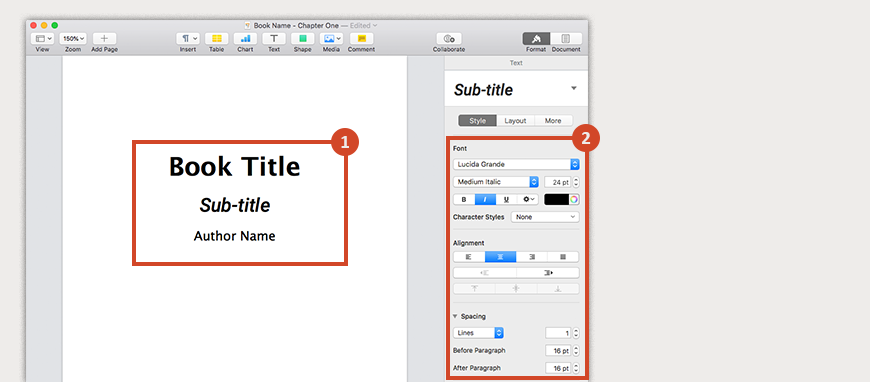
Paragraph alignment should generally be justified to give the book a neat, uniform appearance. Chapter titles should be consistently formatted, ideally using heading styles in Word or design software. Page numbers must be placed in headers or footers, ensuring the first page of each chapter starts without them.
Book Illustration is a crucial element for genres like children’s books, comics, and educational content. Illustrators work with authors to create visuals that enhance storytelling, add emotional depth, and capture the reader’s imagination through artistic interpretation.
Step-By-Step Process For Formatting A KDP Paperback
Formatting your KDP paperback formatting can be broken down into clear steps. Start by finalizing your manuscript and making sure all edits are complete. Choose your trim size early, as this will dictate your page layout. Next, set your margins according to KDP’s specifications, adjusting for page count.
Apply paragraph styles to maintain consistency throughout the book. This includes body text, headings, and subheadings. Insert page breaks at the end of each chapter instead of pressing Enter multiple times. This prevents layout issues during conversion.
Add headers and footers carefully. Typically, even-numbered pages contain the author name while odd-numbered pages show the book title. The first page of a chapter should remain clean without any header or footer.
Book publishers handle the editing, design, production, and distribution of books across print and digital formats. They range from large houses with global reach to niche independent presses, often focusing on specific genres or markets.
Common Mistakes To Avoid In KDP Paperback Formatting
Many authors make the mistake of ignoring KDP’s margin requirements, resulting in text being cut off during printing. Others use inconsistent font sizes or mix different typefaces, which can look unprofessional. Improperly inserted images that appear blurry or pixelated in print are another common issue.
Another pitfall is neglecting to use proper paragraph and heading styles. Manual formatting with spaces and tabs often leads to layout errors. Similarly, failing to check for widows and orphans, single lines at the top or bottom of a page, can make the book look awkward.
Also, some authors forget that paperback layout is different from eBook layout. What works digitally may not translate well into print, so always design with the physical reading experience in mind. Publish my book is the main objective for authors seeking to share their stories with the world. Writers can choose traditional publishing by submitting to publishers or go the self-publishing route for more creative freedom and faster release timelines.
Creating A Professional KDP Paperback
Mastering KDP paperback formatting is an investment in your book’s success. A well-formatted book stands out among self-published titles and enhances your credibility as an author. It ensures a smooth reading experience, meets Amazon’s technical requirements, and leaves a lasting impression on your audience.
By paying attention to trim size, margins, typography, and consistency, you can avoid the pitfalls that trip up many first-time authors. Remember to preview your PDF thoroughly and make adjustments where needed before hitting publish.
Ultimately, KDP paperback formatting is not just a technical requirement, it is an opportunity to present your work in the best possible light. A polished interior design shows readers you respect their time and reading experience, which can lead to better reviews and more loyal fans.


